Behavioral interview AI assistant, invisible on screen
Cue listens to both sides, tracks what the interviewer has asked, and surfaces STAR-structured answers when your memory goes blank.
Last updated:
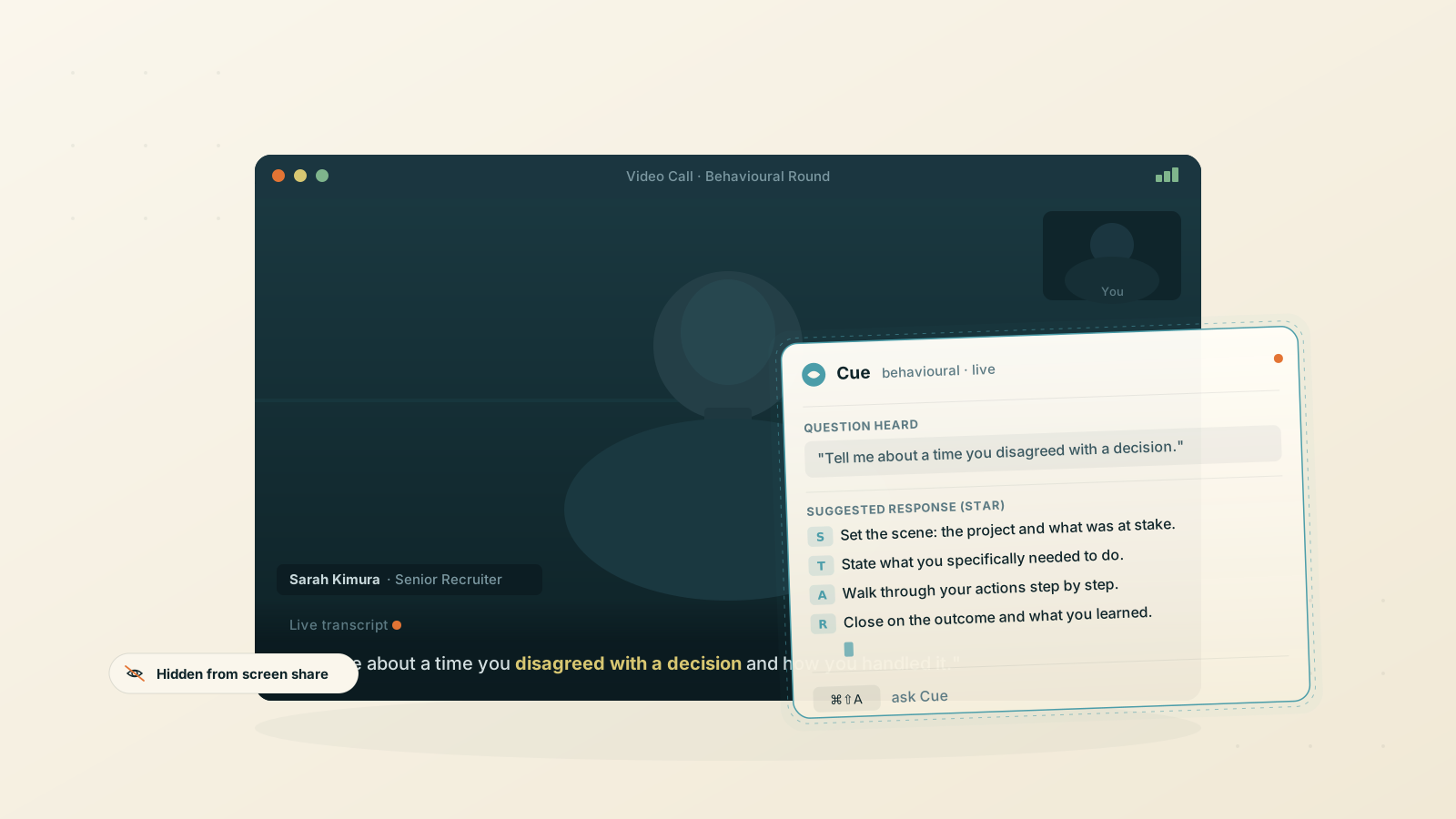
The moment the answer disappears
"Tell me about a time you disagreed with a manager."
You've handled that situation. Probably several times. Under the interviewer's gaze right now, every one of them has gone.
Behavioral questions are where preparation and live performance pull apart. You can spend hours building STAR answers and practicing them at your desk. The moment a follow-up lands on the story you half-prepared, or the question arrives in a phrasing you didn't anticipate, the mental index empties.
A behavioral interview AI assistant sitting invisibly on your screen gives you a way back into the answer. The interviewer sees none of it.
How Cue works in a behavioral interview
1. Open Cue before the call starts
Launch Cue and join your video interview or phone call as normal. The overlay sits above every window on your Mac without appearing in screen shares, recordings, or the interviewer's view. See the supported platforms page for the conferencing tools we have verified.
2. Cue transcribes both sides as you speak
The interviewer's questions appear in the transcript in real time, speaker-labeled, alongside your answers. You can see the full exchange without switching windows or breaking eye contact with the camera.
3. Press the shortcut when a question lands hard
When the question comes in and the answer isn't there, press the keyboard shortcut. Cue reads the full transcript context and the most recent question together, then streams a structured answer. You can start reading while it finishes, form your own words, and respond without a visible pause.
4. Feed it the role before the round starts
One keystroke captures anything on screen. Screenshot the job description, or paste the company's stated values into your system prompt. Cue grounds its answers in the specific role, not a generic script.
Set a custom prompt before the round starts
Cue supports a custom system prompt per scenario. For a behavioral round, the prompt shapes the AI's output before the first question lands.
Here is one you can paste in and adapt:
You are a behavioral interview coach helping me answer questions live.

## Format
- Structure every answer using STAR: Situation, Task, Action, Result.
- Keep answers to 2–3 minutes of spoken content unless I ask for more.
- Start with the situation in one or two sentences, not a long preamble.

## Grounding
- Use only the experience I have given you in this prompt.
- If I haven't given you a relevant story for the question, suggest the closest one I have and flag it.

## Tone
- Professional but not scripted. Write in first person.
- Do not start responses with "Certainly" or restate my question back at me.
Below the prompt, add a short summary of your background: two or three past roles with the key problems you solved. Cue reads this as context for every answer it suggests during the call.
Quick actions sit alongside your prompt. Set up one-click buttons for common mid-call requests: "give me a stronger result for this story", "suggest a better opening line", "what follow-up might come next".
What it covers by question type
Behavioral interviews span a lot of territory. The question types below are the ones that trip most candidates up, and Cue holds up across all of them.
Conflict and disagreement
"Tell me about a time you disagreed with a senior stakeholder." Cue hears the question, reads the experience in your prompt, and suggests a STAR answer grounded in what you've actually done, not a fabricated scenario.
Failure and resilience
"Describe a project that went wrong." The risk here isn't the story; it's the framing. Cue suggests how to close the answer on growth or learning rather than on the failure itself.
Leadership and influence
"Tell me about a time you led without authority." These reward specificity: team size, timeline, the constraint you had to work around. Cue can prompt you to add the detail the interviewer is listening for.
Motivation and values
"Why do you want to work here?" These sound easy and trip people up most. If you've added the company's stated values to your prompt, Cue grounds its response in them rather than a generic answer.
What Cue won't do
A few honest limits.
- It won't invent experience you don't have. Its answers are grounded in what you give it in your system prompt. If you haven't described a relevant situation, it says so and suggests the closest alternative.
- It won't bypass monitoring software. The overlay is excluded from macOS screen capture, but remote-desktop tools and proctoring software are outside what we can verify. Check the supported platforms page before relying on it in any monitored interview environment. The decision to use it sits with you.
- It won't work offline. Both live transcription and AI responses need an internet connection.
- It won't run on Windows or Linux. The stealth overlay uses macOS-native APIs.
- It won't send a follow-up or debrief automatically after the call. The transcript is saved locally on your Mac; use it however you want.
Nothing from your interviews is stored on our servers.
Who uses a behavioral interview AI assistant
- Mid-level and senior candidates in tech, consulting, and finance where behavioral rounds carry as much weight as technical ones.
- Career changers who have the experience but are framing it in a new context for the first time.
- Non-native English speakers who know what to say and need support structuring it under pressure.
The free trial covers two hours of transcription and fifty AI messages per month, enough for several live rounds before you decide. The full behavioral interview AI assistant is macOS-only. Download Cue and use it on the next round that matters, or browse other use cases to see where else it helps.
FAQ
Can the interviewer see Cue during the call?
No. The overlay is excluded from macOS screen capture, so it never appears in a shared window, a recording, or on the interviewer's screen.
How fast does it respond when a question lands?
Under a second for short answers. Longer responses stream as they generate, so you can start reading while the answer finishes.
Will my interview audio be stored?
No. Audio is processed for transcription in real time and never saved to our servers. The transcript and chat history are stored locally on your Mac only.
Is using an AI assistant in a job interview allowed?
That depends on the company and the interview format. Some employers prohibit it; others have no policy either way. Cue does not ship policy guidance. You are responsible for knowing and following the rules of the environment you are in.
What if I haven't prepared a story for a particular question?
Cue will suggest the closest story from the experience you have given it in your system prompt and flag that it is an imperfect match. Whether to use it, adapt it, or be straightforward with the interviewer is your call.
Does it work with Zoom, Google Meet, and Microsoft Teams?
Yes, across the most common conferencing tools on macOS.
Can I use a different prompt for each company or role?
Yes. Cue supports multiple saved system prompts, so you can switch profiles between interviews depending on the role, the company, or the question format.
Ready to try Cue?
Download for macOS and have the invisible AI overlay running in under two minutes. Free to get started — no card required.
Requires macOS 13 Ventura or later